您现在的位置是:网站首页> 编程资料编程资料
ASP.NET实现个人信息注册页面并跳转显示_实用技巧_
 2023-05-24
572人已围观
2023-05-24
572人已围观
简介 ASP.NET实现个人信息注册页面并跳转显示_实用技巧_
题目
新建一个MVC项目,利用HTML、CSS、JS、jQuery、Ajax、jQuery UI等技术设计一个个人信息注册页面。当点击“提交”按钮时,跳转到新的页面显示录入信息。
基本要求:
用户名为6-10个小写字母(小写使用正则式验证,且用户名不能为“wustzz” –用Ajax技术来检测);密码为6位数字,确认密码不一致时有提示;籍贯使用级联(jquery实现);Email必须符合Email格式;手机是11位(假设规定以1569开头);出生年月使用jQuery UI日历组件设置;图片要传递到新的页面显示。
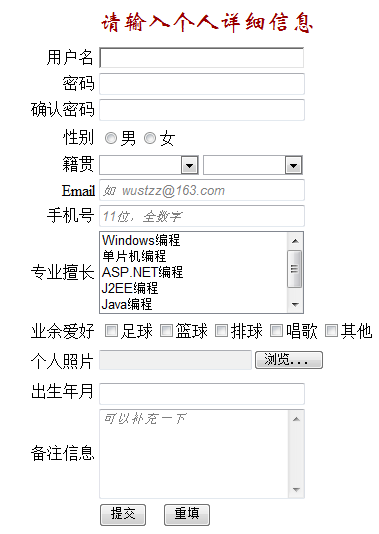
实现效果
(源码在文章结尾)

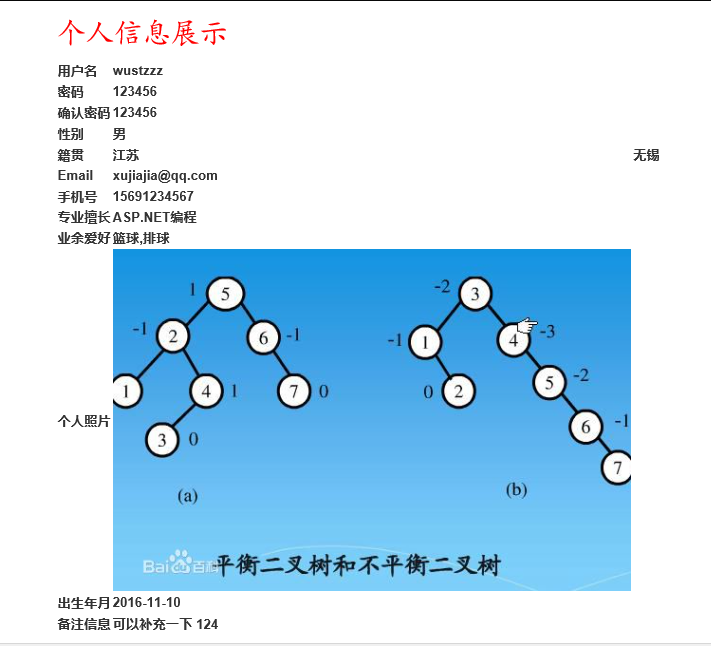
主要涉及知识点
1、基本的html界面编程
2、JavaScript语言
3、jQuery、jQuery UI的使用
4、ASP.NET Request相关操作
5、了解ASP.Net WEB MVC下的目录结构以及基础编程
代码
ProjectController.cs
using System; using System.Collections.Generic; using System.Linq; using System.Web; using System.Web.Mvc; namespace ProjectOne.Controllers { public class ProjectController : Controller { // GET: Project public ActionResult Index() { return View(); } public ActionResult Show() { //获取图片文件 HttpPostedFileBase file = Request.Files["filename"]; if(file != null) { //将图片存储在/Content/UpLoad/目录下,名字为111.png var fileName = Request.MapPath("~/Content/UpLoad/") + "111.png"; file.SaveAs(fileName); } return View(); } } }Index.cshtml
@{ ViewBag.Title = "Index"; } @section scripts{ } 请输入个人详细信息
Show.cshtml
@{ ViewBag.Title = "Show"; } 个人信息展示
| 用户名 | @Request["username"] | |
|---|---|---|
| 密码 | @Request["psd"] | |
| 确认密码 | @Request["psd_again"] | |
| 性别 | @Request["gender"] | |
| 籍贯 | @Request["native_place"] | @Request["major"] |
| @Request["email"] | ||
| 手机号 | @Request["phone"] | |
| 专业擅长 | @Request["speciality"] | |
| 业余爱好 | @Request["hobby"] | |
| 个人照片 |  | |
| 出生年月 | @Request["birthday"] | |
| 备注信息 | @Request["more_info"] |
my_script.js
function checkName() { var u = document.getElementById("username"); var t = document.getElementById("tip_name"); var reg = /^[a-z]{6,10}$/; if (!reg.test(u.value)) { t.innerHTML = "用户名为6-10个小写字母"; return false; } else { if (u.value == "wustzz") { t.innerHTML = "用户名不可以为wustzz"; return false; } t.innerHTML = "用户名填写正确"; return true; } } function checkPassword() { var p = document.getElementById("psd"); var t = document.getElementById("tip_psd"); var reg = /^\d{6}$/; if (!reg.test(p.value)) { t.innerHTML = "密码为6位数字"; return false; } else { t.innerHTML = "密码填写正确"; return true; } } function checkPasswordAgain() { var p1 = document.getElementById("psd"); var p2 = document.getElementById("psd_again"); var t = document.getElementById("tip_psd_again"); if (p1.value != p2.value) { t.innerHTML = "密码前后不一致" return false; } else { t.innerHTML = "密码确认一致"; return true; } } function checkEmail() { var e = document.getElementById("email"); var t = document.getElementById("tip_email"); var reg = /^[\w-]+(\.[\w-]+)*@[\w-]+(\.[\w-]+)+$/; if (!reg.test(e.value)) { t.innerHTML = "必须填写Email格式"; return false; } else { t.innerHTML = "Email填写正确"; return true; } } function checkPhone() { var p = document.getElementById("phone"); var t = document.getElementById("tip_phone"); var reg = /^1569\d{7}$/; if (!reg.test(p.value)) { t.innerHTML = "手机是11位以1569开头的数字"; return false; } else { t.innerHTML = "填写手机正确"; return true; } } function checkAll() { if (checkName() && checkPassword() && checkPasswordAgain() && checkEmail() && checkPhone()) { return true; } return false; }源码地址:
http://download.csdn.net/detail/double2hao/9691584
以上所述是小编给大家介绍的ASP.NET实现个人信息注册页面并跳转显示,希望对大家有所帮助,如果大家有任何疑问请给我留言,小编会及时回复大家的。在此也非常感谢大家对网站的支持!
您可能感兴趣的文章:
相关内容
- 详解将ASP.NET Core应用程序部署至生产环境中(CentOS7)_实用技巧_
- ASP.NET实现电影票信息的增删查改功能_实用技巧_
- 详解Asp.Net Core 发布和部署( MacOS + Linux + Nginx )_实用技巧_
- 详解ASP.NET Core 之 Identity 入门(三)_实用技巧_
- 详解ASP.NET Core 之 Identity 入门(二)_实用技巧_
- 详解ASP.NET Core 之 Identity 入门(一)_实用技巧_
- Asp.net Core 初探(发布和部署Linux)_实用技巧_
- 详解ASP.NET Core 中间件之压缩、缓存_实用技巧_
- jQuery实现金额录入框_实用技巧_
- 详解高效而稳定的企业级.NET Office 组件Spire(.NET组件介绍之二)_实用技巧_




